
Guides
How to Add an AI Chatbot to Your Website in 7 Steps
By ZoeyAI · · 8 min read
If you are wondering how to add an AI chatbot to your website, the short answer is that it takes less time than most people expect. You choose what the chatbot is for, give it accurate information about your business, paste a single line of code into your site and test it before visitors see it. The part that takes real thought is not the installation. It is deciding what the chatbot should say, when it should hand over to a person and how you will keep it accurate.
This guide walks through all seven steps in plain language. It is written for Australian business owners who are not developers, and it works whether you run a clinic, a trade business, a professional practice, a gym or an online store.
What an AI chatbot on your website actually does
A website AI chatbot is a chat window that answers visitors' questions in everyday language, using the information you have given it. Unlike a rule-based bot that follows a fixed script, an AI chatbot can understand a question phrased in many different ways and reply conversationally. A good one also collects contact details when a visitor is ready to enquire, and passes the conversation to your team when a person is needed.
For a small business, the practical benefit is coverage. Questions arrive at night, on weekends and while you are with another customer. A chatbot can answer the routine ones immediately and capture the details of the rest, so you can follow up with context instead of a blank form. If you want a closer look at how that compares with staffed chat, read our guide to AI chatbot vs live chat.
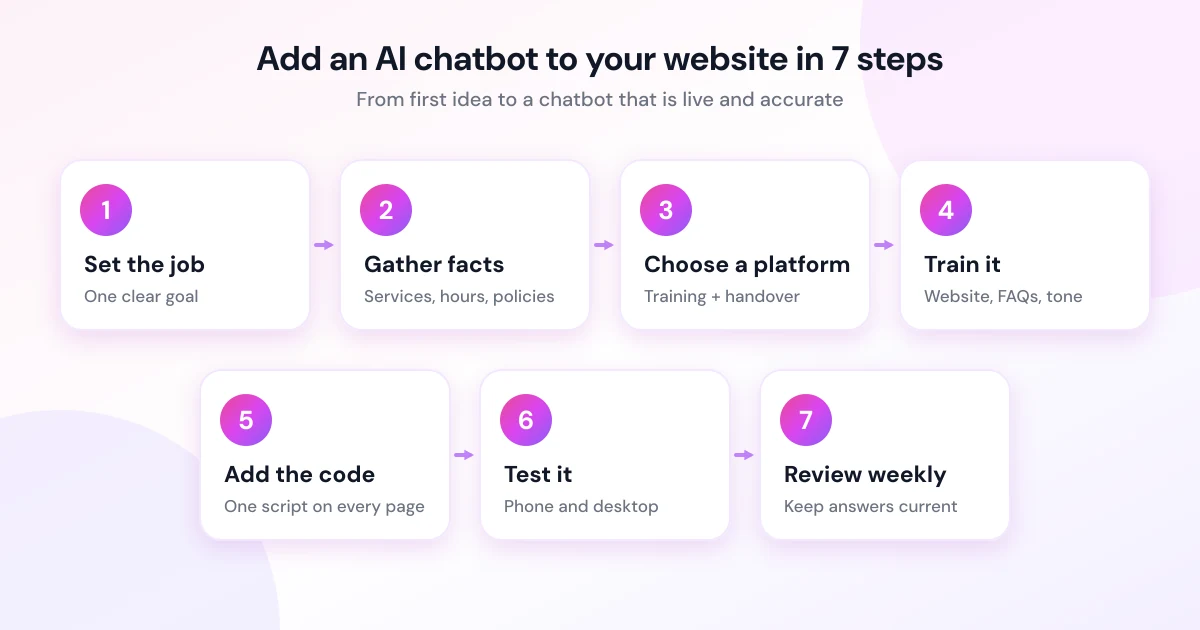
Step 1: Decide what job the chatbot has
Before you touch any settings, write one sentence describing the chatbot's job. For example:
- Answer the ten questions we get asked every week.
- Capture enquiries outside business hours and pass them to the team.
- Help visitors work out which service suits them, then collect their details.
A narrow job produces better results than "handle everything". You can widen it later once you have seen real conversations.
Step 2: Gather the information your chatbot needs
An AI chatbot is only as good as the information behind it. Collect the facts customers ask about most:
- Services you offer and, just as importantly, services you do not offer
- Pricing or price ranges, if you are comfortable sharing them
- Opening hours, locations and the areas you service
- How to book, how quoting works and what happens after an enquiry
- Policies on cancellations, returns, deposits or warranties
Write these down in plain sentences. If your website already explains them well, you may be able to let the chatbot learn from your existing pages rather than retyping everything.
Step 3: Choose a chatbot platform
When comparing platforms, look at the things that affect you after launch rather than only the demo:
- Training method. Can you train it from your website, FAQ entries and custom instructions, or only from a script you build by hand?
- Human handover. Can you step into a conversation yourself, and will you be notified when someone needs you?
- Lead capture. Does it collect names and phone numbers and send them somewhere you will actually see them?
- Pricing clarity. Is the cost per month obvious, and what happens when you reach the conversation limit?
- Installation. Does it work on any website with a copy-and-paste snippet, or only on specific website builders?
ZoeyAI is built for this use. You train it with FAQ entries, custom training sections or a scan of your website, you can take over any live conversation from your dashboard, and installation is one line of code. You can see the current plans in the pricing section. Prices are listed in Australian dollars and include GST, and every new account starts with a 7-day free trial with no credit card required.
Step 4: Train the chatbot on your business
This is the step that decides whether visitors find the chatbot useful. A sensible approach is:
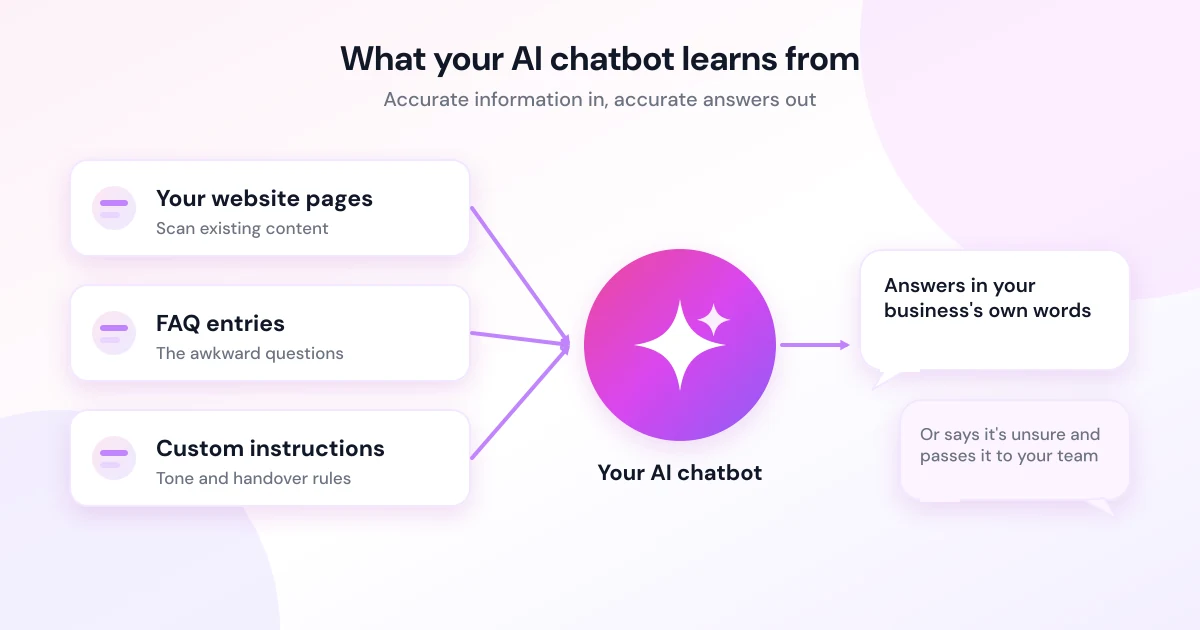
- Start with a website scan or import. If your platform can read your existing pages, use that to create a first draft of what the chatbot knows.
- Add FAQ entries for the awkward questions. Anything that is not obvious from your website, such as how your quoting process works, belongs here.
- Set the tone. Decide whether the chatbot sounds formal, friendly or relaxed, and give it a name that suits your brand.
- Write the handover rule. Tell the chatbot what it should not attempt, such as giving medical, legal or financial advice, and make sure it collects contact details and flags the conversation instead.
Keep the language factual. If the chatbot does not know something, the best behaviour is to say so and offer to pass the question to your team, not to guess.
Step 5: Add the chatbot to your website
Most chat tools give you a short snippet of JavaScript that you paste into your site. With ZoeyAI the snippet looks like this, with your own workspace key in place of the placeholder:
<script src="https://www.zoeyai.com.au/widget.js" data-key="your-workspace-key" async></script>Where it goes depends on how your website is built:
- Custom or hand-coded site: paste it just before the closing body tag of your page template so it loads on every page.
- WordPress: use a plugin or theme setting that lets you add a footer script, or ask your web developer to add it.
- Website builders such as Squarespace or Wix: look for a custom code or code injection setting, and add the snippet to the footer so it appears on every page.
- Online stores: add it to the theme's main layout file so it appears on product and checkout-adjacent pages alike.
The async attribute is worth noticing. It tells the browser to download the script without blocking the rest of the page from loading, as explained in the MDN documentation for the script element. If you care about how quickly your pages feel to visitors, Google's Web Vitals guide explains the metrics worth watching before and after you add any third-party script.
Step 6: Test it like a customer would
Open your website in a private browser window and run through the conversations your customers have. Check each of the following:
- Does it answer your top ten questions correctly, in your voice?
- Does it say "I'm not sure" rather than inventing an answer when you ask something it was not told?
- Does it collect a name and phone number or email when you say you want to enquire?
- Do you receive the notification, and does it contain enough context to follow up?
- Does it look and behave properly on a phone, where most browsing happens?
- Can someone using a keyboard or screen reader open and use the chat window? The W3C's Web Content Accessibility Guidelines overview is the standard reference for this.
Ask a colleague or friend to try to break it. Odd phrasing, typos and off-topic questions are exactly what real visitors will send.
Step 7: Be transparent, then keep it accurate
Two things matter after launch.
Transparency and privacy. The Office of the Australian Information Commissioner says organisations should make sure people know they are interacting with an AI system, and should update their privacy policies and collection notices to cover it. Their guidance on privacy and commercially available AI products is worth reading before you go live. In practice, that means labelling the chatbot clearly as AI, collecting only the details you need and checking that your privacy policy mentions chat. This is general information, not legal advice, so check your own obligations.
Accuracy. Review real conversations weekly for the first month, then monthly. Whenever prices, hours or services change, update the chatbot at the same time as your website. A chatbot that confidently quotes last year's price does more harm than having no chatbot at all.
Common mistakes to avoid
- Launching with thin information. If the chatbot only knows your business name, visitors will quickly hit a wall.
- Hiding the human option. Make it easy for a visitor to reach a person when they ask for one.
- Collecting too much, too early. Asking for five details before answering anything drives people away. Answer first, then ask.
- Never reading the transcripts. The conversations show you what customers really want to know, which is useful for your website copy as well as the chatbot.
A realistic timeline
Most of the effort goes into step 2 and step 4, because they require you to write down what you know. The installation itself is usually a few minutes. A sensible plan is to spend an afternoon training and testing, launch quietly, then refine over the following weeks using real questions. If you get stuck during setup, ZoeyAI's support page is the quickest way to reach the team.
Frequently asked questions
How long does it take to add an AI chatbot to a website?
Pasting the code takes a few minutes. Preparing the information the chatbot needs and testing it properly usually takes a few hours, and it is worth doing carefully because that preparation determines how useful the chatbot is.
Do I need a developer to add an AI chatbot?
Not usually. Most platforms provide a snippet you paste into your site settings. If your website is custom-built and you are not comfortable editing the template, a developer can add the line in a few minutes.
Will a chatbot slow down my website?
A script loaded with the async attribute does not block the page from rendering, but every third-party script has some cost. Test your page speed before and after installation and see whether anything changes.
Do I have to tell visitors it is an AI?
The OAIC recommends that public-facing chatbots are clearly identified as AI, and being upfront is good practice regardless of the law. Check your own obligations under the Privacy Act and any industry rules that apply to you.
Can I try a chatbot before paying?
With ZoeyAI, every new account gets a 7-day free trial with no credit card required. After the trial you can choose a paid plan or stay on the free Starter plan, which is human-only live chat without AI replies.
What should I do if the chatbot gets something wrong?
Correct the information it was given, add a clearer FAQ entry and review the conversation to see why it went off course. Taking over the chat yourself in the moment, then fixing the underlying content afterwards, keeps the customer looked after and improves the chatbot for next time.
Keep reading
"AI Chatbot Privacy Australia: What the Privacy Act and APPs Mean for Your Business"
AI chatbot privacy Australia guide covering the Privacy Act, the Australian Privacy Principles, commercially available AI products, data security, spam consent and practical steps for website chatbots.
"Intercom Alternative for Small Business: How to Choose Without Overpaying"
Looking for an Intercom alternative for small business? Compare what Intercom is built for with what SMBs usually need from an AI chatbot, lead capture and human handover — with Australian pricing and privacy notes.