
Industries
"AI Chatbot for Property Managers: Handle Tenant Requests and Rental Enquiries"
By ZoeyAI · · 7 min read
An AI chatbot for property managers takes on the messages that fill a rent roll team's inbox: the tenant whose oven has stopped working, the applicant asking whether a listing allows pets, the owner wanting to know who to call about an invoice. Property managers juggle inspections, leasing, arrears and repairs, so routine questions often wait hours for a reply, and tenants with a genuine emergency can be stuck in the same queue as someone asking about the bin day.
A chatbot can reply immediately, collect the details your team needs, flag urgent repairs and send each conversation to the right person. This guide covers what a property management chatbot should handle, how to treat emergency repairs, what it must never promise, and how it differs from a chatbot built for sales agents.
What does an AI chatbot for property managers actually do?
A property management chatbot usually handles three groups of people:
- Current tenants. Logging maintenance requests, explaining how to report a repair, sharing office hours and pointing tenants to the right forms or portal.
- Prospective tenants. Answering questions about advertised rentals from the listing, such as rent, availability date, pets, parking and inspection times, and capturing applicant contact details.
- Landlords and prospective owners. Explaining your management services as published on your website and capturing enquiries from owners who want a rental appraisal or to switch agencies.
That is a different job from a sales agency chatbot. If you also sell property, our guide to AI chatbots for real estate agents covers buyer enquiries and appraisal requests on the sales side.
Logging maintenance requests properly
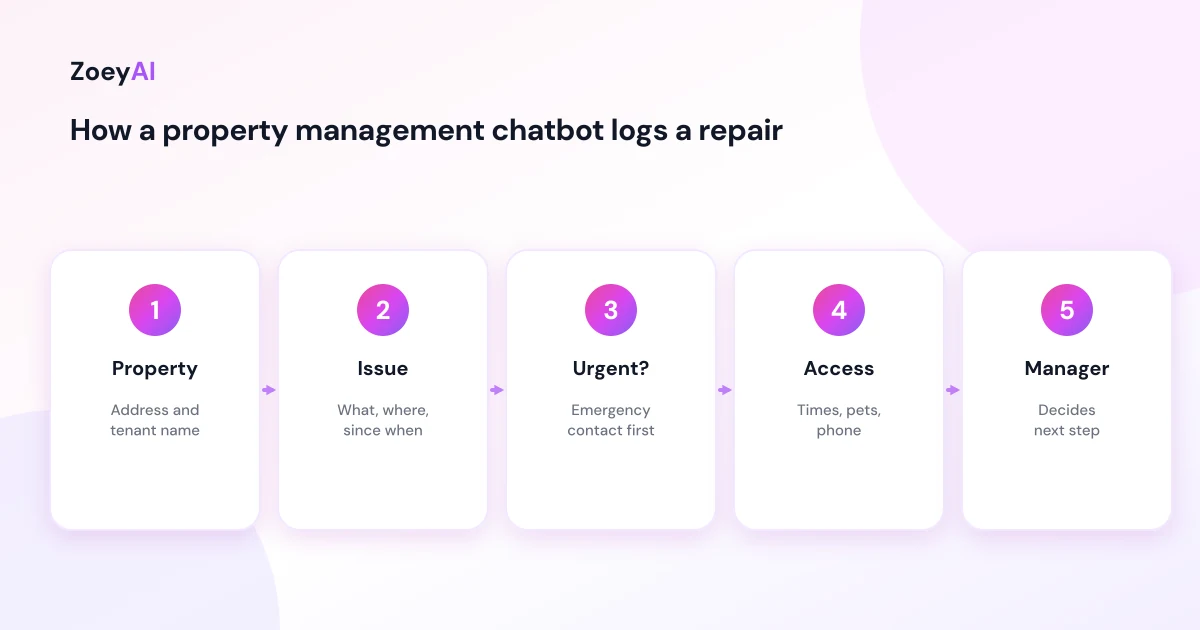
Maintenance is where a chatbot saves the most back-and-forth. Instead of a vague email ("the tap is broken"), the chatbot can ask the same questions your team would:
- Property address and tenant name
- What the problem is, where it is, and when it started
- Whether it is getting worse or causing damage
- Best contact number and times
- Access arrangements, including pets at the property
- Whether the tenant can upload photos through your usual portal or email
The chatbot then passes the request to the property manager, who decides what happens next. It should not approve work, book a tradesperson on its own authority or tell a tenant who will pay. Those decisions depend on the tenancy agreement, the owner's instructions and the law in your state.
Emergency repairs need a separate, tested script
Every state defines urgent or emergency repairs differently, so build the chatbot's script from your own state's rules. In Queensland, the Residential Tenancies Authority lists emergency repairs, including a burst water service, a blocked or broken toilet, a serious roof leak, a gas leak, a dangerous electrical fault and flooding. The RTA also explains that the tenancy agreement must include the nominated repairer's details and who the first point of contact is for emergency repairs.
Consumer Affairs Victoria explains repairs in rental properties, and NSW Fair Trading covers getting repairs done in its guide to renting during a residential tenancy. Read the guidance that applies to your rent roll and write the chatbot's emergency reply with it in front of you.
When a tenant describes something that sounds like an emergency repair, the chatbot should:
- Give the emergency contact straight away, using the number in your tenancy agreements or your after-hours line.
- Tell the tenant to call 000 if anyone is in danger, there is a fire or they smell gas.
- Log the request so your team sees it first thing, but never leave an emergency waiting in the chat queue.
Test the script with different phrasings. Tenants rarely use the words "emergency repair"; they say "water everywhere", "power keeps tripping" or "toilet is overflowing".
What the chatbot must not say
A property management chatbot should stay factual and neutral. It should never:
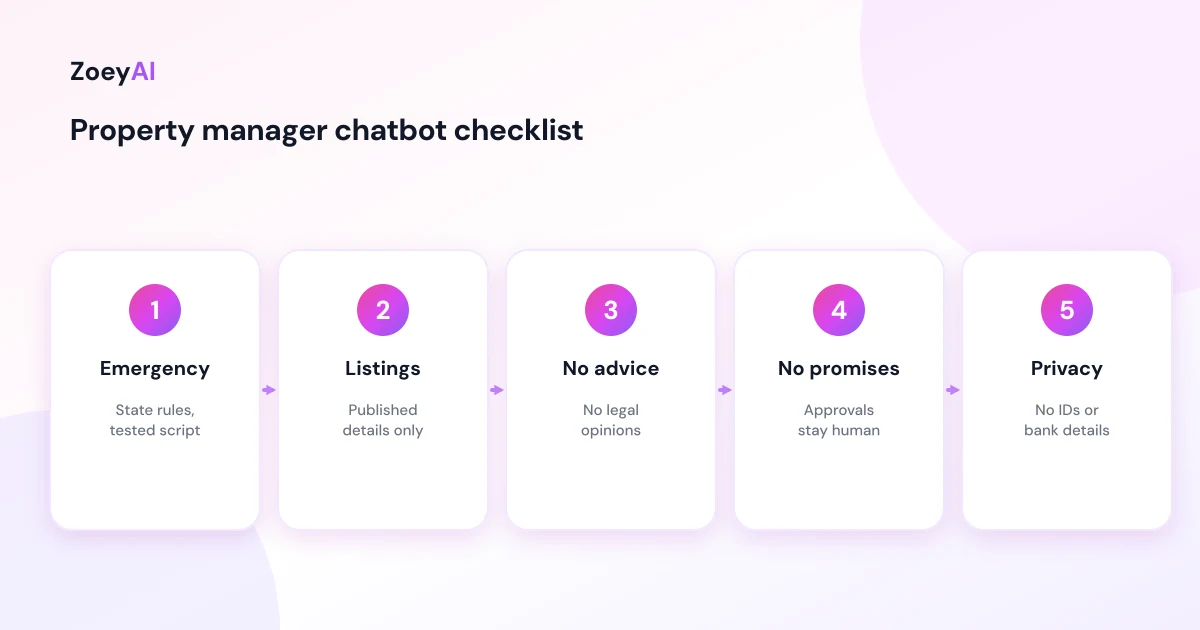
- Give legal advice about breaches, notices, bond disputes or ending a tenancy. Point tenants and owners to the relevant state body or a team member.
- Promise outcomes, such as "your application will be approved", "the owner will fix that this week" or "you'll get your bond back".
- Make up listing details. Rent, availability, pet rules and inclusions must come from the published listing.
- Discuss other tenants or owners. It should not confirm who lives at an address or share anyone's details.
- Handle arrears or disputes. Those conversations need a person.
Rental enquiries from prospective tenants
Applicants ask the same questions about every listing: is it still available, are pets considered, is there an inspection this weekend, how do I apply, is parking included? A chatbot can answer from the listing and your published application process, then capture the applicant's name, phone and email with the property they are interested in.
Keep listing data current. If a property is leased, remove it from the knowledge base the same day so the chatbot does not keep inviting applications. Our guide on how to train an AI chatbot on your website content explains how to rescan your site when listings change.
Tenant details and privacy
Property managers hold a lot of personal information: names, phone numbers, addresses, rental histories and sometimes identity documents. Under the Privacy Act 1988 and the Australian Privacy Principles, collect only what you need and explain how you use it. For a chatbot, that means:
- Do not ask for identity documents, bank details or rental ledgers in chat. Point applicants and tenants to your usual secure application or portal.
- Keep the chatbot's questions to what the team needs to act on the enquiry.
- Mention chat enquiries in your privacy policy.
- Make the greeting clear that it is an AI assistant, for example: "Hi, I'm the agency's AI assistant. I can log maintenance requests and answer questions about our rentals. For an emergency repair, call [number]."
Our guide to AI chatbot privacy in Australia covers the basics in more detail.
Routing conversations to the right person
Property management teams split work by portfolio, so routing matters:
- Maintenance requests to the property manager for that address.
- Emergency repairs to the emergency contact or after-hours line, immediately.
- Leasing enquiries to the leasing consultant.
- Owner and new business enquiries to the business development manager.
- Arrears, disputes and complaints to a senior property manager.
ZoeyAI lets a team member take over a live conversation from the dashboard on Basic and Pro plans, and Pro includes up to 5 team seats plus webhooks if you want leads sent to another system. Business hours settings let the chatbot tell people when the office will reply.
How to tell if it is working
Measure what reduces workload and improves response times:
- Maintenance requests logged with complete details on the first contact
- Emergency conversations, checked weekly to make sure each one got the emergency contact
- Leasing enquiries captured outside office hours
- Questions the chatbot could not answer, so you can add them
- Accuracy, by reading a sample of conversations each week
What it costs
ZoeyAI pricing is in AUD and includes GST. There is a free Starter plan for live chat without AI. AI plans start at $29 a month incl. GST on Basic (100 conversations a month, knowledge base, website scanner, business hours and human takeover) and $79 a month incl. GST on Pro (250 conversations a month, up to 5 team seats, webhooks, CSV export and branding removal). Enterprise pricing is available on request, and every new account starts with a 7-day free trial. See the pricing section for current details.
Frequently asked questions
Can an AI chatbot for property managers log maintenance requests?
Yes. It can collect the address, a description of the issue, urgency, contact details and access arrangements, then send the request to the property manager to action.
How should the chatbot handle emergency repairs?
It should give the emergency contact or after-hours number immediately, tell the tenant to call 000 if anyone is in danger, and log the request. Build the script from your state's definition of emergency or urgent repairs.
Can the chatbot approve repairs or book tradespeople?
It should not. Approving work depends on the tenancy agreement, the owner's instructions and state law, so that decision stays with the property manager.
Can it answer questions about rental listings?
Yes, from the published listing: rent, availability, pets, parking, inspections and how to apply. Remove leased properties from the knowledge base promptly.
Should tenants share documents in chat?
No. Identity documents, bank details and ledgers should go through your secure application process or portal, not the website chat.
Is this different from a chatbot for real estate sales agents?
Yes. A property management chatbot focuses on tenants, maintenance and leasing, while a sales chatbot focuses on buyers, vendors and appraisal requests. Many agencies need both.
Keep reading
"AI Chatbot for Event Venues: Answer Capacity and Package Questions and Capture Enquiries"
How an AI chatbot for event venues answers questions about spaces, capacity, published packages and policies, captures wedding, corporate and party enquiries with the right details, treats dates as requests rather than bookings and hands every lead to your events team.
"AI Chatbot for Funeral Homes: Calm Answers and a Fast Path to Your Staff"
How an AI chatbot for funeral homes answers practical questions about services, published prices and what to do first, uses a calm and respectful tone, never pressures families, protects privacy and connects people with your staff quickly, including after hours.