
Guides
"WhatsApp Chatbot for Business Australia: What to Know Before You Build One"
By ZoeyAI · · 7 min read
A WhatsApp chatbot for business Australia owners can run sounds simple: customers message you on an app they already use, and an automated assistant answers the first questions. In practice there are real decisions to make about consent, privacy, message rules, cost and who picks up the conversation when the bot cannot help. This guide walks through those decisions in plain language so you can choose the right first channel for your business.
We are an AI chatbot company, so a quick note on scope. ZoeyAI is built around a chatbot on your website, not a WhatsApp product, and this article does not claim otherwise. Where WhatsApp rules matter, we point you to the official sources, because they change and you should always confirm the current terms yourself.
What a WhatsApp chatbot actually is
A WhatsApp chatbot is software that reads incoming WhatsApp messages and replies automatically, usually for common questions like opening hours, service areas, pricing guidance, bookings and order status. Businesses connect through the WhatsApp Business app for small, manual use, or through the WhatsApp Business Platform for automated or higher-volume use. Meta publishes the details on WhatsApp for Business and in its developer documentation.
The important point is that automation sits on top of an account you have to set up, verify and keep in good standing. That is a bigger commitment than adding a chat widget to a page you already own.
Why Australian businesses consider it
Customers already message friends and family on WhatsApp, so some will prefer it to a contact form. It can suit businesses with a lot of repeat questions, appointment-style enquiries and customers who live partly overseas. It is not equally popular with every audience, though. Plenty of Australian customers still start with a Google search, land on your website and expect an answer there.
Before building anything, ask a plain question: where do your customers already contact you? Check your inbox, your call log and your website forms. If almost nobody uses WhatsApp today, a WhatsApp chatbot will mostly add a channel to maintain, not solve a problem.
Consent and spam rules you cannot skip
Automated messages to customers are covered by Australian spam law. The ACMA explains the basics on its page about how to avoid sending spam: commercial messages need consent, must identify the sender and must give a way to opt out. WhatsApp also has its own opt-in expectations for businesses that start conversations, which you can read in Meta's documentation.
A practical way to stay on the right side of both:
- Let the customer start the conversation. A reply to a message they sent is very different from an unsolicited promotion
- Record consent. If you plan to send updates, capture a clear opt-in and the date it was given
- Identify the business. Say who is messaging and why
- Make opting out easy. Honour a stop request straight away
- Keep marketing separate from service replies. Do not slip promotions into a booking confirmation
This is general information, not legal advice. If you plan to message customers at scale, speak to a professional who knows Australian communications law.
Privacy: treat chats as personal information
Customers share names, phone numbers, addresses and sometimes sensitive details in chat. Under the Privacy Act and the Australian Privacy Principles, you need to be open about what you collect, collect only what you need, protect it and let people access it. The OAIC sets this out on its page for the Australian Privacy Principles, and it has specific guidance on privacy and commercially available AI products that is worth reading before you connect any AI tool to customer conversations.
We cover the website side of this in our guide to AI chatbot privacy in Australia. Many of the same habits apply on any channel:
- Tell customers up front that they are talking to an automated assistant
- Do not ask for payment card numbers or passwords in chat
- Limit who in your team can read transcripts
- Decide how long you keep conversations and stick to it
- Check where your chatbot vendor stores and processes data
What a good WhatsApp chatbot should do
Whatever tool you choose, hold it to the same standard you would expect of a new staff member on the front desk.
Answer only from approved information. The bot should rely on your own content, such as services, hours and policies, and say so when it does not know. A chatbot that guesses prices or availability creates disputes.
Capture the lead properly. If someone wants a quote, collect the minimum details you need to follow up, explain why you are asking and tell them when to expect a reply.
Hand over to a person. Customers should be able to ask for a human at any time, and the person who takes over should see the whole conversation. Our human handover best practices article lists eight rules that apply on any channel.
Be honest after hours. If nobody is online, the bot should say when the team is back rather than pretending someone is typing.
Website first, WhatsApp second
For many small businesses the sensible order is to start with a chatbot on your website. You control the page, there is no separate account approval, you can show your privacy notice next to the chat and you can measure which pages produce enquiries. Once the website bot answers accurately and your team handles handovers well, you will know which questions and workflows are worth carrying into another channel.
ZoeyAI trains on your own website content, captures leads and supports human takeover, with a 7-day free trial so you can test it on real customer questions.
A launch checklist for any WhatsApp chatbot for business Australia teams plan
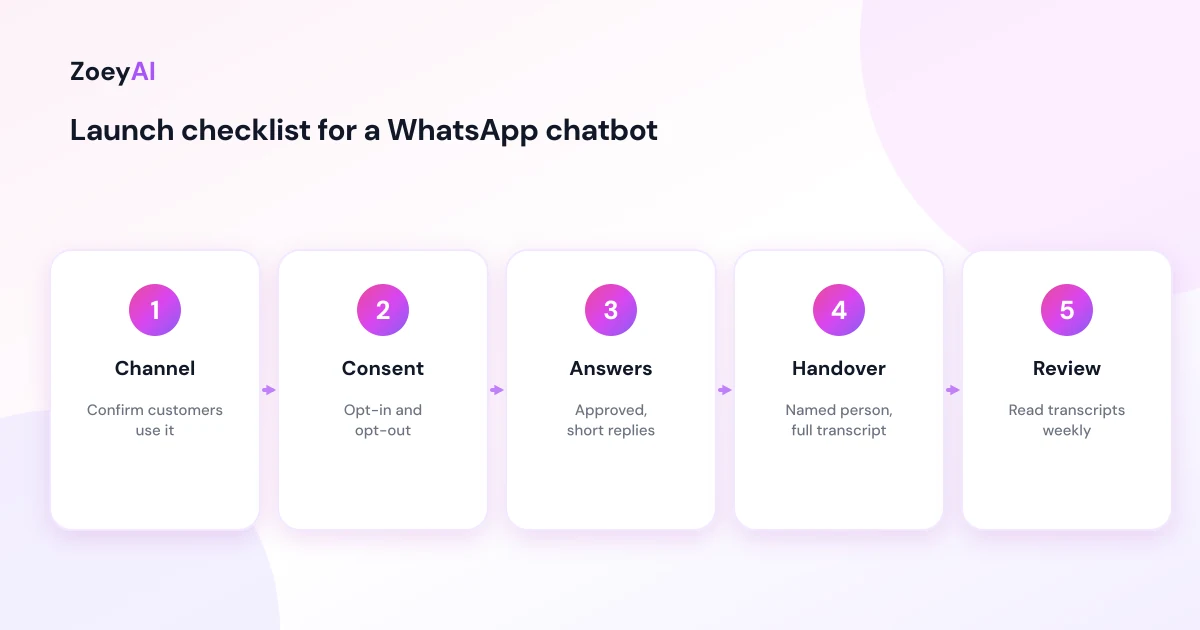
Use this list before you switch anything on:
- Confirm demand. Count how many enquiries already arrive by WhatsApp
- Pick the account type. Decide between the manual business app and the platform for automation, and read the current terms
- Write approved answers. Draft 15 to 30 short answers to your most common questions, and see our guide on how to write chatbot FAQs
- Set consent and opt-out. Decide exactly how customers opt in and out
- Plan handover. Name who answers, during which hours, and how fast
- Test with real questions. Run 20 past enquiries through the bot before going live
- Review weekly. Read transcripts, fix wrong answers and retire answers nobody uses
What does it cost?
WhatsApp itself and any vendor you connect will have their own pricing, so check current figures directly with them. For the website side, ZoeyAI has a free Starter plan for live chat without AI. AI plans start at $29 a month incl. GST on Basic (100 conversations a month, knowledge base, website scanner, business hours and human takeover) and $79 a month incl. GST on Pro (250 conversations a month, up to 5 team seats, webhooks, CSV export and branding removal). Enterprise pricing is available on request, and every new account starts with a 7-day free trial. See the pricing section for the current details.
Frequently asked questions
Do I need a WhatsApp chatbot for business Australia customers will use?
Not necessarily. If your customers mostly find you through search and your website, a website chatbot usually delivers more value first. Add WhatsApp when you can show that real customers already prefer to message you there.
Is a WhatsApp chatbot legal in Australia?
Automated messaging is allowed, but commercial messages must follow Australian spam rules and WhatsApp's own policies, and the personal information you collect falls under the Privacy Act. Read the ACMA and OAIC guidance linked above, and take legal advice for large campaigns.
Does ZoeyAI work on WhatsApp?
ZoeyAI is designed for chat on your website. Check our site for the current list of supported channels before you plan around a specific one.
Can a chatbot replace my team on WhatsApp?
It can handle repeat questions and collect details, but a person should handle complaints, complex quotes and anything sensitive. Design the handover first and the automation second.
How accurate are AI answers?
Accuracy depends on the content you provide and how often you review conversations. Keep your source information current, and treat the first month as a testing period.
What should I do first?
Write down your 20 most common customer questions, decide where those questions arrive today and answer them well in one channel. Then expand if the numbers justify it.
Keep reading
"AI Chatbot for Event Venues: Answer Capacity and Package Questions and Capture Enquiries"
How an AI chatbot for event venues answers questions about spaces, capacity, published packages and policies, captures wedding, corporate and party enquiries with the right details, treats dates as requests rather than bookings and hands every lead to your events team.
"AI Chatbot for Funeral Homes: Calm Answers and a Fast Path to Your Staff"
How an AI chatbot for funeral homes answers practical questions about services, published prices and what to do first, uses a calm and respectful tone, never pressures families, protects privacy and connects people with your staff quickly, including after hours.